 Applied to: SQL Server (2005-2022) , Azure SQL Database, Azure Synapse, Azure Fabric.
Fragmentation occurs when data is modified in a table. When you insert or update data in a table (via INSERT or UPDATE), the table’s corresponding clustered indexes and the affected non-clustered indexes are modified. This can cause an index leaf page split if the modification to an index cannot be accommodated in the same page. A new leaf page will then be added that contains part of the original page and maintains the logical order of the rows in the index key. Although the new leaf page maintains the logical order of the data rows in the original page, this new page usually will not be physically adjacent to the original page on the disk. Or, put a slightly different way, the logical key order of the index does not match the physical order within the file.
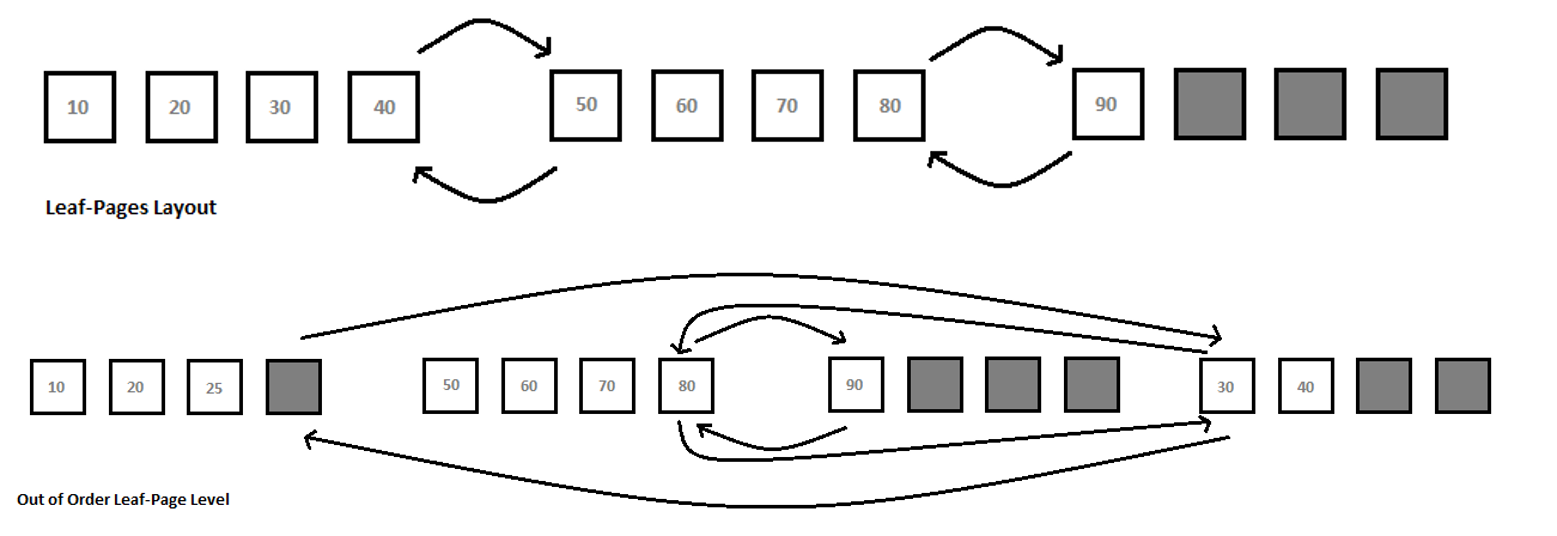
For example, suppose an index has nine key values (or index rows) and the average size of the index rows allows a maximum of four index rows in a leaf page. As explained before, the 8KB leaf pages are connected to the previous and next leaf pages to maintain the logical order of the index, the above figure illustrates the layout of the leaf pages for the index.
Since the index key values in the leaf pages are always sorted, a new index row with a key value 25 has to occupy a place between the existing key values 20 and 30. because the leaf page containing these existing index key values is full with the four index rows, the new index row will cause the corresponding leaf page to split. A new leaf page will be assigned to the index, and part of the first leaf page will be moved to this new leaf page so that the new index key can be inserted in the correct logical order. The links between the index pages will also be updated so that the pages are logically connected in the order of the index. As shown in above figure, the new leaf page, even though linked to the other pages in the correct logical order, can be physically out of order.
The pages are grouped together in bigger units called Extents, which can contain eight pages. SQL Server uses an extent as a physical unit of allocation on the disk. Ideally, the physical order of the extents containing the leaf pages of an index should be the same as the logical order of the index. This reduces the number of switches required between extents when retrieving a range of the index rows. However, page splits can physically disorder the pages within the extents and they can also physically disorder the extents themselves. With the leaf pages distributed between two extents, ideally you expect to read a range of index rows with a maximum of one switch between the two extents. However, the disorganization of pages between the extents can cause more than one extent switch while retrieving a range of index rows.
For a highly transactional database, it is desirable to deliberately leave some free space within your leaf pages so that you can add new rows, or change the size of existing rows, without causing a page split. Index fragmentation is different from disk fragmentation. The index fragmentation Cannot be fixed simply by running disk defragmentation tool, because the order of pages within a SQL Server file is understood only by SQL Server, not by Operating System.
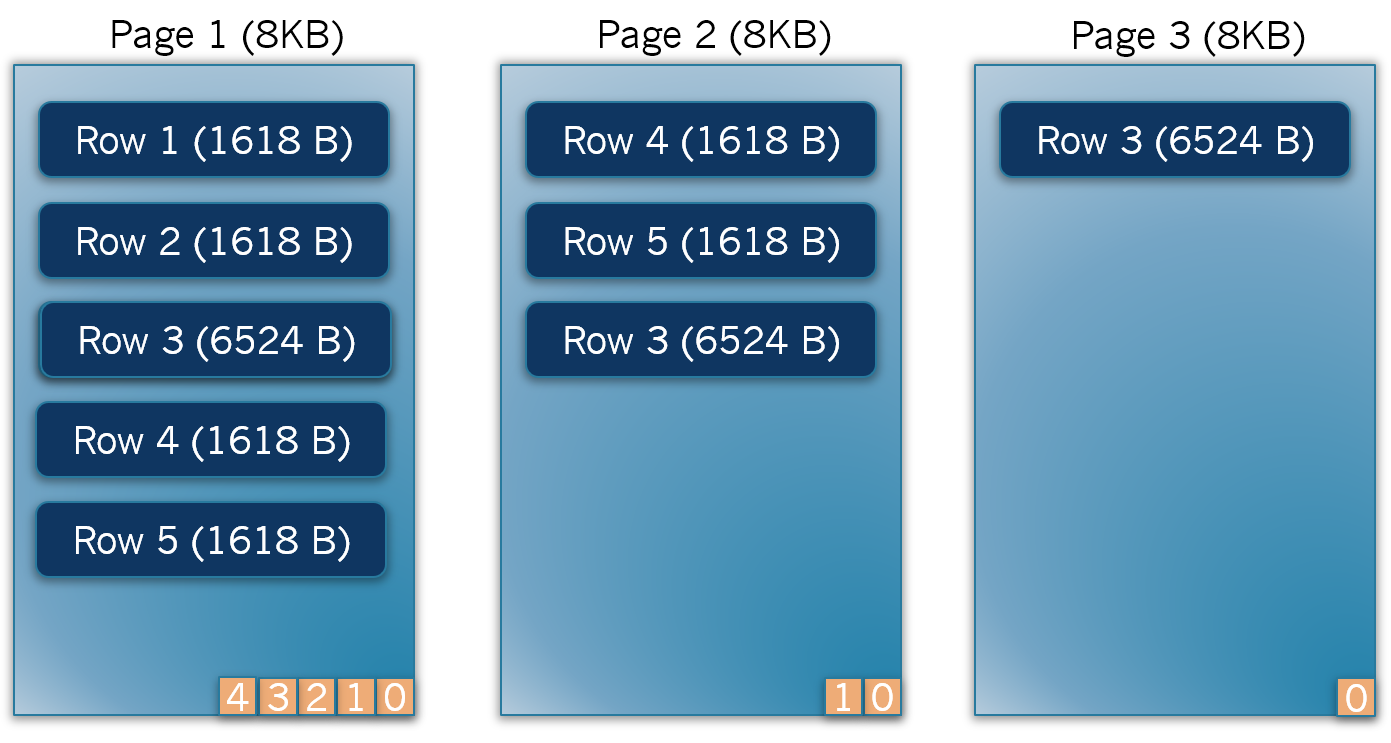
As above figure shows, 5 rows are exists within Page 1 and each row has 1618Bytes. Once Row 3 is updated to 6524Bytes, therefore SQL Server storage engine creates another data page to accommodate Row 4,5 and 3. At this point also the Row 3 is not able to be accommodated in Page 2, then finally SQL Server creates third data page and move the Row 3 into the data page.
The average size of a row in the clustered index leaf page is not just the sum of the average size of the clustered index columns. It is the sum of the average size of all the columns in the table, since the leaf page of the clustered index and the data page of the table are the same.
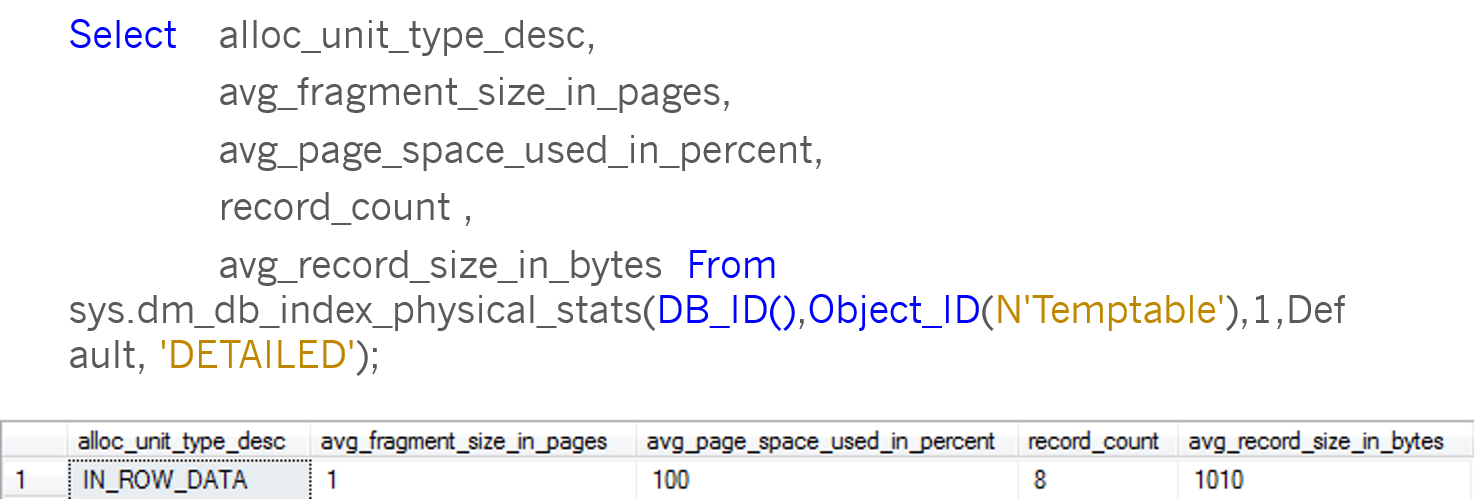
The maximum size of a rows in SQL Server is 8,060 Bytes. Therefore, if the internal overhead is not very high, all eight rows can be accommodated in a single 8KB page. To determine the number of leaf pages assigned to the clustered index. From the Page_Count column in the above output figure, you can see that the number of pages assigned to the clustered index is 1. you can also see the average space used, 100 in the avg_page_space_used_in_percent column. From this you can infer that the page has no free space left to expand the content of C3, which is of type VARCHAR(10) and is currently empty.

If you attempt to expand the content of column C3 for one of the rows as above statement, it should cause a page split. From the above output figure, you can see that SQL Server has added a new page to the index. On a page split, SQL Server generally moves half the total number of rows in the original page to the new page. Therefore, the rows in the two pages are distributed as shown before.
Both internal and external fragmentation adversely affect data-retrieval performance. External fragmentation causes a noncontiguous sequence of index pages on the disk, with new leaf pages far from the original leaf pages, and their physical ordering different from their logical ordering. Consequently, a range scan on an index will need more switches between the corresponding extents that ideally required, as explained earlier in this module. Also, a range scan on an index will be unable to benefit from read-ahead operations performed on the disk. If the pages are arranged contiguously, then a read-ahead operation can read pages in advance without much head movement.
For better performance, it is preferable to use sequential I/O, since this can read a entire extent in a single disk I/O operation. By contrast, a noncontiguous layout of pages requires non-sequential or random I/O operations to retrieve the index pages from the disk, and a random I/O operation can read only 8KB of data in a single disk operation.
In the case of internal fragmentation, rows are distributed sparsely across a large number of pages, increasing the number of disk I/O operations required to read the index pages into memory and increasing the number of logical reads required to retrieve multiple index rows from memory. As mentioned earlier, even though it increases the cost of data retrieval, a little internal fragmentation can be beneficial, because it allows you to perform INSERT and UPDATE queries without causing page splits.
You can analyze the fragmentation ratio of an index by using the sys.dm_db_index_physical_stats DMF. For a table with a clustered index, the fragmentation of the clustered index is congruous with the fragmentation of the data pages, since the leaf pages of the clustered index and data pages are the same. sys.dm_db_index_physical_stats also indicates the amount of fragmentation in a heap table. Since a heap table does not require any row ordering, the logical order of the pages is not relevant for the heap table.
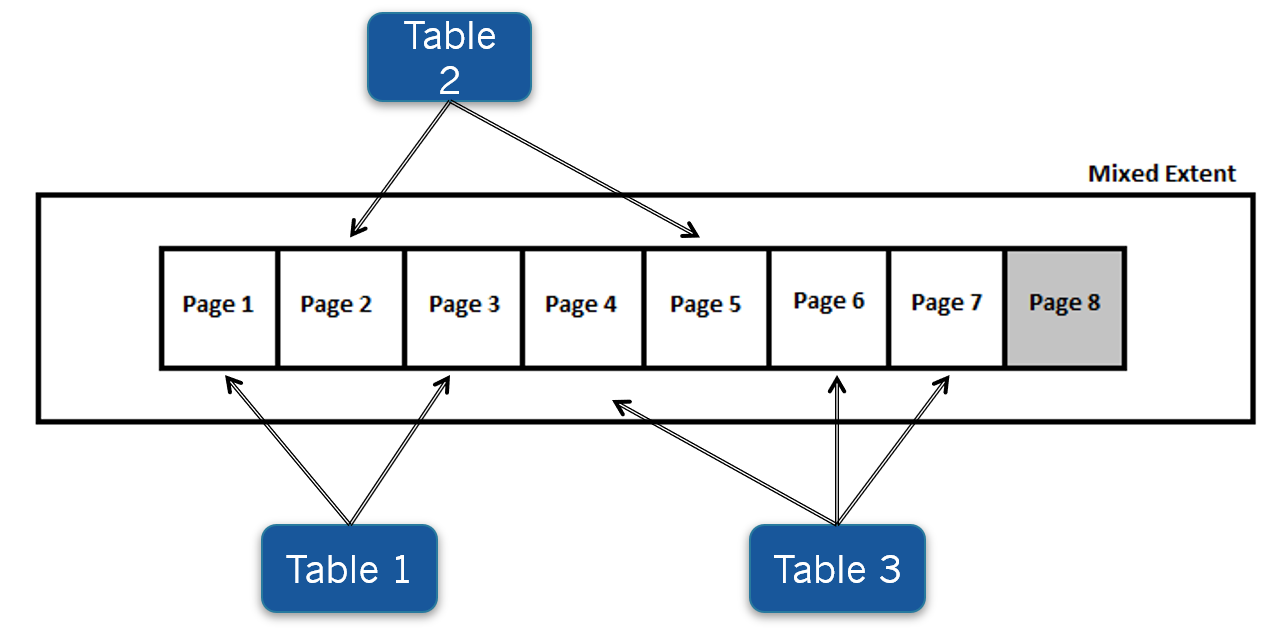
Do not be overly concerned with the output of sys.dm_db_index_physical_stats for small tables. For a small table or index with fewer than eight pages, SQL Server uses mixed extents for the pages. The distribution of pages across multiple mixed extents may lead you to believe that there is a high amount of external fragmentation in the table or the index, when in fact this is by design in SQL Server and is therefore perfectly acceptable.
You can resolve fragmentation in an index by rearranging the index rows and pages so that their physical and logical orders match. To reduce external fragmentation, you can physically reorder the leaf pages of the index to follow the logical order of the index. You can achieve this through the following techniques:
The internal fragmentation of an index is reduced by compressing more rows per leaf page in an index. Compressing more rows within a leaf page reduces the total number of pages required for the index and in turn decreases disk I/O and the logical reads required to retrieve a range of index rows. On the other hand, if the index key values are highly transaction, then having fully compressed index pages will cause page splits. Therefore, for a transactional table, a good balance between maximizing the number of rows in a page and avoiding page split is required.
SQL Server allows you to control the amount of free space within the leaf pages of the index by using the FillFactor option. If you know that there will be enough INSERT queries on the table or UPDATE queries on the index key columns, then you can pre-add free space to the index page using the FillFactor to minimize page splits. If the table is read-only, you can create the index with a high fill factor to reduce the number of index pages.
Create the clustered index before any non-clustered index creation, otherwise the existing non-clustered indexes will be automatically rebuild to use the clustered index key. Try to use Reorganize command to defragment index in case the internal fragmentation is low. Reorganize command provides high concurrency with very minimal locking and blocking. Set the FillFactor option to 70 for transaction databases, this value is ideal for any kind of OLTP databases.
Maximize performance benefits by automatically detecting and resolving issues through AI-DBA intelligence optimization.
Request Demo